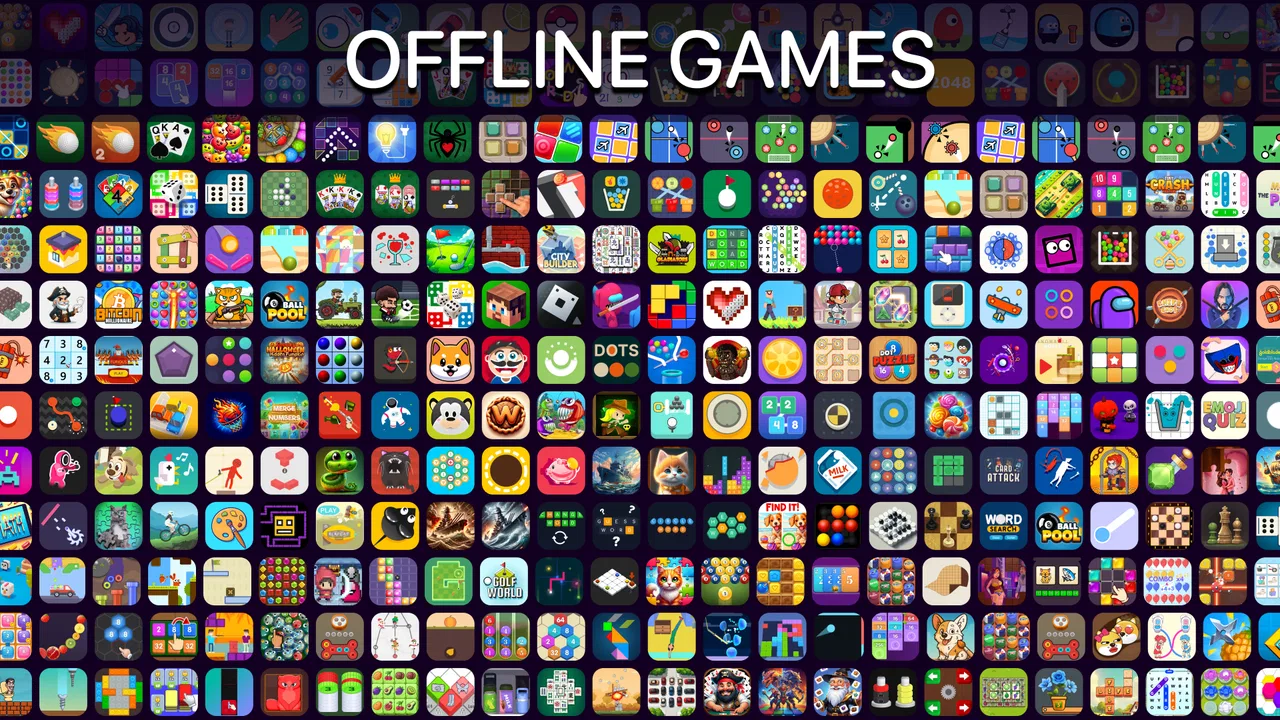
Offline Games No WiFi internet
- 4.7
- Rating
- 100.00M
- Installs
- Free
- Price

 Analysis by App-foxy
I like casual games that do not demand a long tutorial before they become useful. Offline Games No WiFi internet takes that approach by collecting small puzzle, block, card, and two-player activities in one place. I tested it as the kind of app I would keep available for a short break, a journey without reliable data, or a quiet moment when I want something interactive without committing to a large game.
The main appeal is simple: it is a free offline game collection rather than one single puzzle with a narrow style. The app is made by Fun Offline Games, belongs to the casual category, and is suitable for Everyone 10+. Its broad collection makes it approachable for children, adults, and friends sharing one device, although the variety also means that not every activity will feel equally polished or equally interesting to every player.
What to expect before you start playing
My first impression was that this is best understood as a pocket game shelf. You open it looking for something quick, browse the available mini-games, and choose the activity that matches your mood. Some moments call for a color or block challenge, while others are better suited to cards or a local two-player session. That flexibility is more important than any one individual game because it prevents the app from becoming stale after a few short sessions.
You May Also Like

 AccuWeather: Weather Radar
AccuWeather Review: A Quick, Clear Forecast for Everyday Decisions
For everyday plans, the best forecast is the one you can understand quickly. AccuWeather makes rain timing, radar, and local conditions easy to act on, with a few trade-offs.

 Hill Climb Racing
Why Hill Climb Racing Still Turns Crashes Into One More Run
A tiny car, a bumpy hill and one more upgrade: Hill Climb Racing keeps resurfacing because its simple chaos makes every near-miss feel personal.

 AliExpress - Shopping App
AliExpress Makes Global Shopping Feel Personal, but Shoppers Bear the Risk
AliExpress turns a global marketplace into a pocket-sized discovery engine. Its reach is useful, its shopping loop compelling, and its trade-offs easy to miss.

 Lords Mobile: Kingdom Wars
Lords Mobile Is a Kingdom-Building Routine, Not a Quick Match
A case-by-case verdict on the building, battles, device demands, and social commitments that make Lords Mobile rewarding for some players and exhausting for others.

 PDF Scanner app - TapScanner
TapScanner Makes Paperwork Easier to Capture, Check, and Share
TapScanner makes scanning with a phone feel less like a rescue operation and more like a dependable step in getting work done. Its capture tools are useful, though not flawless.

 Block Blast!
 Shows How Much a Puzzle Game Can Leave Out
A quiet grid game shows why puzzle players increasingly value instant clarity, repeatable skill and low-pressure play—and where the genre still needs to catch up.
More From Our News Desk
View All News


The store summary highlights mini puzzles, color blocks, cards, and two-player play, and that gives a fair idea of the experience without promising a deep campaign. I would not install it expecting a story, a large competitive community, or the complexity of a dedicated strategy game. I would install it because I want several lightweight options in one download, especially when I may not have an internet connection.
The scale of its audience is notable: the game has passed 100 million installs and holds a 4.5 average from roughly 573 thousand ratings. Those figures suggest that the basic idea works for a very large number of casual players, but popularity should not be confused with a perfect fit. Someone who wants one carefully balanced puzzle system may prefer a specialist title, while someone who values choice in short sessions will probably appreciate the broader format here.
There is no purchase required to get started. The game is free, with optional in-app purchases ranging from $0.99 to $5.49 per item. I see that as a reason to begin cautiously rather than assuming every part of the experience is unlocked in the same way. If you are setting it up for a child, I would review the purchase controls on the device first. That is a small preparation step, but it avoids an unpleasant surprise later.
The app was released on August 1, 2020, and its current version is 3.53. It runs on Android 7.0 or later. In practical terms, that makes it accessible to many older Android devices, which suits its role as a low-commitment game for spare time. I would still leave some storage and battery available, as I would with any collection containing several activities, but I would not approach installation as though I were downloading a demanding 3D title.
The first setup is deliberately uncomplicated
After installing, I recommend opening the game when you have a minute to look around rather than immediately handing the phone to someone else. The useful first task is to identify how the collection is organized and notice which activities appeal to you. This small orientation period matters because the app is not built around one obvious starting board. Its strength is choice, but choice can feel slightly untidy when you are expecting a single linear menu.
For a first-time user, the safest routine is to choose the simplest-looking puzzle or block activity, play one short round, and then return to the selection screen. Do not judge the whole app from the first mode you open. The collection is intentionally mixed, so a player who dislikes one card activity may still enjoy a color challenge or a two-player option. I found it more useful to treat each mode as a separate snack-sized game than to expect them all to share exactly the same rhythm.
The offline design is especially helpful during setup and later use. You can prepare the app before a flight, a long car ride, or an area with weak reception, then use it without planning around a connection. That makes it different from many modern casual games that are technically small but still rely on online services for their normal flow. Here, the important habit is to open it once at home and learn the menu before you need it somewhere inconvenient.
One practical tip is to use the app as a rotation rather than forcing yourself to finish a mode. If a puzzle starts feeling repetitive, switch to cards; if you are sitting with another person, try the two-player choice; if you only have a few minutes, return to a familiar block activity. This rotation gives the collection more value than repeatedly playing the same option until it loses its charm.
Your first meaningful success should come quickly
I would define a first success here as completing one small challenge cleanly, not mastering the entire collection. Start with a mode whose rules are visually obvious. Take a moment to observe the board, look for the simplest available move, and avoid rushing simply because the game feels casual. The goal is to understand the interaction and finish a round with confidence.
That first completed activity gives you a useful reference point. You learn how the app communicates progress, how quickly a round ends, and whether the controls feel comfortable on your particular screen. If the first mode feels too easy, that is not necessarily a weakness; it may be doing its job as an entry point. Move to another activity before deciding that the whole game lacks challenge.
For younger players, I would sit with them for the first round and explain the difference between experimenting and making a mistake. The Everyone 10+ rating makes the app broadly approachable, but age suitability does not mean every child will understand every mode immediately. A short shared session can turn the collection into a calm activity rather than another app that a child opens and abandons because the first screen was unclear.
For adults, the first success is more useful when you connect it to a real break in your day. I used this kind of game most naturally between tasks: one quick puzzle while waiting for a meeting, a card round during a quiet commute, or a short session before putting the phone away at night. The lack of an online requirement removes one common source of friction, because I do not have to wait for a connection before making that small amount of progress.
A less obvious advantage is that the collection can work as a social fallback. If two people are sharing one phone, a two-player activity gives the device a purpose beyond individual scrolling. It will not replace a full tabletop game or a dedicated multiplayer title, but it can fill the awkward few minutes when two people are waiting together and want something more engaging than conversation about the wait itself.
Where new players can become confused
The biggest adjustment is understanding that the app is a bundle, not a single carefully paced adventure. A player may enter one activity and assume its rules represent everything else, then feel surprised when another option uses a different style of play. I found it better to expect variation in controls, pace, and difficulty. The menu is the map; there is no need to treat the first choice as a permanent commitment.
Another possible point of friction is the difference between offline convenience and long-term depth. Playing without internet is excellent for access, but it also means the experience is centered on the content already inside the app. If you want fresh opponents, online rankings, live events, or a constantly changing challenge, this is probably not the right destination. A dedicated online game will serve that purpose better, even if it is less dependable in places with poor reception.
The range of activities can also create uneven expectations. A person who loves puzzles may find the card options less compelling, while someone looking for a relaxed card game may not care about block challenges. That is not a flaw in the offline concept, but it does mean the app’s value depends on how many of its styles match your preferences. I would give it several short tries before making a final judgment, but I would not keep it installed solely because the collection is large.
Optional purchases are another detail worth keeping in mind. The free entry point is convenient, but the presence of items priced from $0.99 to $5.49 means the complete experience may invite spending. I would avoid buying anything during the first session. First learn which modes you actually return to, then decide whether an optional item adds enough value for your own use. For a family device, parental purchase protections are a sensible part of the setup.
The age rating also deserves a practical reading. Everyone 10+ is reassuring for a broad audience, but parents should still consider how their child responds to competition, repeated attempts, and optional purchases. The game can be a harmless shared pastime, yet the best experience comes when the adult sets expectations around session length and spending instead of assuming the rating handles every family decision.
How it compares with more focused alternatives
Compared with a dedicated puzzle game, this collection offers more variety but usually less identity. A specialist puzzle app can spend all its attention on one rule set, refine its difficulty curve, and make every new level feel connected. Offline Games No WiFi internet gives up some of that focus in exchange for having several different activities ready in one place. I would choose the specialist option for serious improvement in one puzzle style, and this app for variety during unpredictable spare time.
Compared with a traditional card app, the advantage here is that cards are only one part of the package. You can switch when you get bored, and the two-player option may be more useful when someone is sitting beside you. The trade-off is that a dedicated card app may offer a deeper ruleset, more customization, or a more refined interface for players who already know exactly what they want.
Against online casual games, the deciding factor is reliability. This app is the better choice when you are traveling, conserving data, or using an older device in a place where a connection cannot be trusted. Online alternatives are stronger when you want social competition, updates, or a sense that the game world is continually changing. I would keep both types available if gaming is a regular hobby, but for a simple offline backup, this one is easier to justify.
The two-player angle is useful but should be viewed realistically. It makes the app more flexible than a purely solo collection, yet it does not turn the phone into a full party platform. Screen size, turn-taking, and the simplicity of the activities all affect how enjoyable a shared session becomes. It works best for a short friendly contest, not for replacing a dedicated local multiplayer game night.
Small habits that make the collection more useful
My first recommendation is to build a personal three-mode rotation. Pick one puzzle activity for concentration, one block or color activity for quick visual play, and one card or two-player option for variety. This prevents the app from becoming a folder of choices that you never actually use. It also makes the next session faster because you already know where to go.
My second recommendation is to test the app in the environment where you intend to rely on it. Open it before leaving home, then try it again in airplane mode or somewhere with no dependable signal. The point is not to perform a technical experiment; it is to make sure you understand the offline workflow before a journey or waiting period. A game is most helpful when it is already familiar at the moment you need it.
My third recommendation is to use the two-player mode as a conversation starter rather than as a replacement for social time. A quick round can make waiting at a café or clinic less dull, but the best result comes when the game remains secondary to the people sharing it. That is where this collection feels most distinctive: it can move from solo distraction to a small shared activity without requiring another download.
I would also keep expectations modest about replay value. The collection may keep casual use fresh because the formats differ, but repeated players will eventually notice the limits of any fixed set of mini-games. If you find yourself opening only one activity and wishing it had deeper progression, that is a clear sign to move to a dedicated alternative rather than spending automatically on optional items.
Who should install it, and who should skip it
I think it is a good match for someone who wants a free, compact source of offline entertainment with more than one style of play. It suits travelers, families sharing a device, people with inconsistent mobile service, and casual players who prefer short sessions to long campaigns. It is also a sensible backup for an older Android phone that can run Android 7.0 or later and does not need a graphically demanding game.
I would be more hesitant to recommend it to a player who wants a single highly polished puzzle system, a detailed story, online matchmaking, or a strong sense of progression. Those needs are better served by focused games built around one purpose. I would also skip it if you dislike browsing through multiple mini-games and would rather open an app that immediately presents one familiar challenge every time.
Its broad age rating makes it approachable, but families should still supervise spending and help younger players understand the different modes. For adults, the lack of internet is the clearest practical benefit. For children, the shared-play possibility may matter more. For solo puzzle fans, the decision depends on whether variety is more valuable than depth.
My final take after using it as an everyday backup
Offline Games No WiFi internet succeeds because it solves a very ordinary problem: I want something to play now, but I do not want to depend on a signal, install several separate apps, or commit to a long session. Its collection of casual puzzles, blocks, cards, and two-player activities gives it more flexibility than a one-mode game, and the free entry point makes trying it low risk.
The limitations are equally clear. The experience is broader than it is deep, the modes may not all appeal equally, and optional purchases mean I would set spending boundaries before sharing it with a child. Players seeking online competition or carefully structured progression should choose another type of game. Those are not minor details; they determine whether the app feels like a useful pocket collection or an unfocused bundle.
For me, it works best as a dependable offline companion: something I can open during a short wait, pass to a friend for a quick two-player round, or use when a connection is unavailable. The developer’s current version is 3.53, and the game has earned around 2.8 thousand written reviews alongside its large rating base, which fits the impression of a widely used casual product rather than a niche experiment. I would recommend installing it if your priority is quick variety without internet, while keeping your expectations centered on convenience instead of advanced depth.
FAQs for Offline Games No WiFi internet
01What types of games are available in Offline Games No WiFi Internet?
Offline Games No WiFi Internet offers a diverse range of genres, including puzzles, action, strategy, and adventure games. This variety ensures that there is something for every type of player, whether you are looking for quick entertainment or a more immersive gaming experience. The app frequently updates with new games, keeping the selection fresh and engaging.
02Is Offline Games No WiFi Internet truly offline, or do some features require internet access?
All games available through Offline Games No WiFi Internet can be played entirely offline, meaning no internet connection is required after the initial download. This makes it ideal for users who travel frequently or have limited data plans. However, to download additional games or updates, an internet connection will be necessary.
03Are there any in-app purchases or ads in Offline Games No WiFi Internet?
While the app provides free access to a wide variety of games, some may include optional in-app purchases for additional features or enhancements. Additionally, users may encounter ads, which help support the developers. However, the games remain fully playable without making purchases, ensuring a complete experience at no cost.
04What are the system requirements for installing Offline Games No WiFi Internet?
Offline Games No WiFi Internet is designed to be compatible with most Android and iOS devices. It generally requires Android version 4.4 or higher and iOS version 9.0 or later. The app is optimized to run smoothly on both smartphones and tablets, but it's advisable to check the specific requirements for each game within the app.
05How can I ensure the games remain updated in Offline Games No WiFi Internet?
To keep your games updated, you will need to connect your device to the internet periodically. The app will notify you of available updates, which can then be downloaded to ensure optimal performance and access to new features. Regular updates also help fix any bugs and improve security.
Pros
- Great variety of games available offline.
- No internet needed saves data usage.
- Quick loading times enhance play.
- User-friendly interface for easy navigation.
- Regular updates with new games.
Cons
- Limited multiplayer options.
- Ads can be frequent and intrusive.
- Some games lack depth.
- Basic graphics in certain games.
- In-app purchases can be pricey.

Offline Games No WiFi internet
Gallery